Plug in and walk away with

An alarm when it's charged

  • Any level, 10–100%
  • Loud on silent
  • Nothing leaves your phone

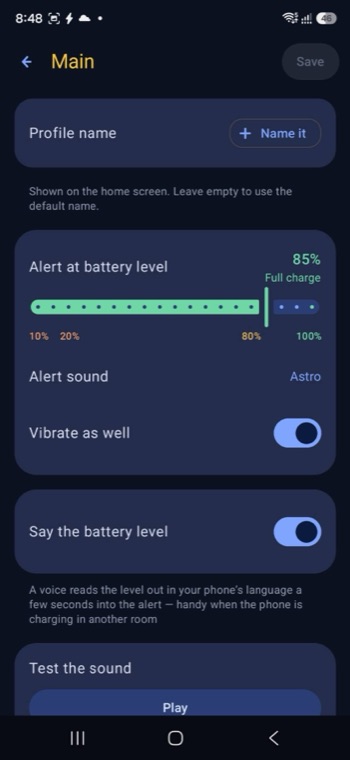
Full Battery plays an alarm the moment your battery reaches the level you choose, so you can unplug it instead of leaving it charging all night.

Not just "full"

Set it to 80% overnight to protect the battery, or 15% when you are in a hurry before heading out. Both work the same way.

Full Battery app icon Coming
soon

Why it matters

80%

The level worth stopping at

Or any other level you pick

Lithium batteries age faster when they sit at 100% for hours. Charging to around 80% and unplugging is the simplest way to keep a battery healthy for longer. Full Battery is the reminder that makes that habit possible without watching the screen.

See what it does

Four things it gets right

A charge alarm is only useful if you actually hear it and it keeps running. That is where the work went.

You will actually hear it

The alarm plays through the alarm channel, not the media channel — so it is loud even when your ringer is silenced. A test button lets you check the volume before you rely on it.

10–100%

Pick any level, not just full

80% overnight to protect the battery, or 15% in a hurry before heading out — both are one drag of the slider.

Keeps working after a restart

The alert survives a reboot. You don't have to remember to open the app again after restarting your phone.

Quiet when you want it quiet

Quiet hours turn the night-time alert into a silent notification instead of a sound, and several settings profiles let you switch setups without rebuilding them.

Three steps, then forget about it

Set it once. The app does the watching, and tells you when to come back.

1 · Set your level

Drag the slider to the percentage you want to be told about, pick the alarm sound, and decide whether it should vibrate.

2 · Plug in and walk away

The app watches the charging level in the background. A small running notice stays in your shade, because Android requires one while an app observes charging.

3 · Hear it, then unplug

Stop the sound from the notification, from inside the app, or tap Keep charging to full if you changed your mind and want it to run to 100%.

Full Battery app icon
Not on Google Play yet

Full Battery

No account, no sign-in, no server. Your settings never leave your phone, and the app cannot read your files, your location, or your messages.

  • PriceFree
  • Keep it unlockedOne rewarded video every 7 days,
    or a one-time lifetime unlock
  • RequiresAndroid 8.0 and above
  • AccountNone
  • Alert range10% to 100%
Free No banners, no pop-ups anywhere in the app
Coming soon on Google Play

What we promise, and what we don't

Each of these is written into the privacy policy or is a limit of what Android allows — not marketing copy. Reviews from real users will appear here once the app is on Google Play.

The advertising system stays completely dormant until you tap "Watch ad" yourself. If you never tap it, no ad request is made and no advertising identifier is ever read.

Ads stay asleep

Privacy policy, section 4

We have no backend server. Your alert settings, profiles and appearance live in Android's private app storage and are gone when you uninstall.

Nothing to collect

Privacy policy, sections 2 and 3

It cannot stop the charging itself. No Android app can do that without root. It reminds you to unplug, and it does that reliably.

What it does not claim

A limit of Android, stated up front

Frequently asked

Can it stop the charging automatically?
No, and neither can any other Android app without root access. Full Battery alerts you so you can unplug it yourself — that is the honest version of this feature.
Will I hear it if my phone is on silent?
Yes. The alarm uses Android's alarm channel, which stays audible when the ringer is silenced or the media volume is down. Use the test button to check the level before you rely on it overnight.
Why does it show a permanent notification?
Android does not let an app watch the charging level continuously without a visible foreground notice. That small notification is the price of the alert working reliably.
Does it drain the battery?
The app reacts to the charging events Android already broadcasts rather than polling in a loop, and it only runs while you are plugged in.
What data does it collect?
None. There is no account and no server behind the app. Settings stay in Android's private app storage and are deleted when you uninstall. See the privacy policy.


Stop charging overnight

Full Battery is finishing testing and is not on Google Play yet. Email us and we will tell you the day it goes live — nothing else, no list, no marketing.

Tell me when it launches Coming soon on Google Play